Two men and woman watching the laptop on office
21.10.2025

What to personalize and how to choose the right segments

We all know what personalization means, but let’s do a quick recap.
If your company’s marketing was a restaurant where the brand, menu, and staff form a complete experience, personalization would be the maître d’ who remembers your favorite table and dish – and then asks, “The usual, or shall we surprise you today?”

Customers love that. In fact, they expect it.

A large-scale McKinsey study puts it plainly: most consumers expect personalized interactions and get frustrated when they don’t receive them. Well-executed personalization typically increases revenue by 10–15%. In other words, personalization is no longer a niche feature or a futuristic vision – it’s real business impact.

Where to start and what to personalize first

This year, I’ve talked with hundreds of marketing leaders and professionals about getting started with personalization – and scaling it for real impact. The first concern is almost always resources: “We’re just two people, and all our time goes into outbound. We can’t rewrite every piece of content.”

That’s a fair concern. But research shows personalization is now a basic customer expectation and an investment that pays off.

And here’s the good news: once you get started, you’ll soon realize it’s not actually extra work – it’s simply a smarter, more effective way to do impactful marketing.

So, where should you begin?

Start where personalization has the biggest business impact.

Start with the most visible touchpoints

Your website’s hero section and main CTA are usually the best places to test and develop personalization.

A small tweak – in the headline, image, or reference – can spark interest and lead visitors to the next, more relevant CTA. That next step should ideally be personalized based on the user’s role or intent.

Continue the journey with recommendations and relevant content

Recommendations and related content blocks are another great way to extend the personalized experience. They keep the user journey logical and engaging.

Instead of seeing generic content, the visitor finds follow-up content tailored to their industry or interests – and conversion gets that much closer.

How to choose the right segments

The key to keeping content manageable is to build segmentation around clear criteria.

In B2C, segments are typically defined by:

  1. Intent: what the visitor is trying to do right now (research, compare, buy)
  2. Lifecycle stage: new, returning, or existing customer

In B2B, there’s an additional dimension:

  1. Role: According to Gartner, 6–10 people are typically involved in B2B purchase decisions. Role-based experiences aren’t just nice to have – they’re a powerful way to address concerns and move deals forward. Typical roles include buyers, users, project managers, and technical specialists – each with their own needs and perspective.

Here are some useful segmentation factors to consider:

  • Intent and on-site behavior
  • Lifecycle stage or purchase history
  • Role or job title
  • Industry (especially when references or messages differ clearly)
  • Campaign or traffic source
  • Geographic factors

How many segments are enough?

There’s no universal answer – only you can decide what’s right for your business. For most organizations, 4–8 core segments cover about 80% of the impact.

You can create two or three variations per key element – one default version and one or two personalized ones. A single variation can often serve multiple segments.

If you don’t see a clear improvement in traffic quality or conversions, merge the segment or element into a broader one. Even a one-person marketing team can manage personalization this way.

The golden rule:
Only personalize when the content or message actually changes.

A real-life example of personalization

A B2B company sells industrial production machinery and software.

Their product page hero is personalized in two ways:

  • Default version – shown to all visitors
  • Industry-specific version – adjusts both content and page structure

Additionally, they’ve built role-based variations:

  • Developer or technical specialist: “Try the API with your own data (3 min)” + code sample and sandbox CTA
  • Business decision-maker: “Achieved ROI in 3 months” + references and calendar link
  • Existing customer: “Have you tested feature X?” + direct path to the product

This approach ensures each visitor quickly finds their next relevant step – without overwhelming the marketing team or the content workflow.

In summary: Personalization works – when you set the right boundaries.

  1. Start with the most visible touchpoints.
  2. Build a few core segments.
  3. Personalize only when the message truly changes.

That’s how you create experiences that feel tailor-made and deliver measurable results.

I’m happy to spar with you about building segments or developing your personalization strategy further.


Author

Three people working with laptop
14.10.2025

Proven customer satisfaction in our maintenance services

We recently asked our maintenance customers how likely they would be to recommend Druid as a partner and the results were delightfully positive: our Net Promoter Score (NPS) came in at 60.

The NPS measures how willing customers are to recommend a company to their friends or colleagues. A score that high reflects deep trust and long-term collaboration – something we truly value.

But we don’t believe a single number tells the whole story. Surveys can’t replace real conversations.
What we value most are the Big Picture meetings we hold once or twice a year with our clients. Together, we review what has been done, what’s working, and where we can improve next. These sessions often spark insights that move both the service and the partnership forward,” says Mikko Hämäläinen, CEO of Druid.

We’ve been tracking customer satisfaction for a long time, previously using a 1–5 scale. The latest result was an excellent 4.8. Now, the NPS gives us a broader benchmark, since it’s widely used across industries. Our score of 60 ranks as excellent, especially considering that the IT industry median is 44.

The Net Promoter Score formula

% of promoters – % of detractors

What makes our customers happy?

Three themes stood out clearly in the responses: reliability, speed, and proactivity.
Our customers say issues get solved quickly, and our experts don’t just react – they suggest improvements before problems arise. The account team takes time to listen and always thinks about how each solution can serve the client’s bigger picture.

Collaboration that sparks continuous improvement

Many clients especially appreciate how we bring new perspectives to the table “Have you thought about this?” or “This could be developed further.”
These conversations fuel ongoing improvement. Websites become living platforms that grow and evolve alongside the client’s business.

A skilled, human team makes collaboration effortless

Feedback also highlighted the human side of collaboration. Our team is seen as skilled, approachable, and easy to work with.

Long-term partnerships with familiar faces create a sense of trust, while our “We’ll make it happen” attitude earns praise time and again. You can see it in everyday work: challenges are handled professionally, and new ideas are always met with enthusiasm.

Listening, learning, and growing together

The NPS result motivates us to keep improving our services even further. We listen carefully to our clients and constantly look for new ways to make their daily work easier.

Maintenance isn’t just a safety net running in the background, it’s an active way to ensure our clients can focus on their business, knowing everything works as it should.

A big thank-you to everyone who took part in the survey. Honest and open feedback is invaluable to us. It helps us keep developing our services to serve our clients’ needs even better,” says Hämäläinen.

Author

Cartoon male character looks desperate
03.09.2025

How to harness personalization on manufacturing websites

The right information for the right visitor – exactly when it matters.

Customers in the manufacturing industry represent a diverse mix. Buyers focus on business outcomes, while technical experts need precise product details. Resellers care about order information and their own customer base. One client wants a tailored solution, another browses entire product families. Geography also shapes what options make sense to offer.

In this blog, I’ll share practical ways personalization helps manufacturing companies serve their customers better.

Role-based content speaks differently to buyers and technical experts

Visitors come to your site with different expectations. A technical expert looks for hard facts: certifications, specifications, and measurements. A buyer cares more about references, benefits, and ROI.

You can personalize content by role in several ways:

  • Build dedicated landing pages and user journeys for each audience.
  • Engage visitors with dynamic content.
  • Offer the right contact options and forms that match each stage of the journey.

The right product and the right path

A broad product catalog can quickly become overwhelming. No customer wants to scroll through hundreds of items – from relays to drill bits.

Marketing, sales, and digital services should share one goal: guide customers quickly to the solution that matters – whether it’s a corrosion-resistant structure, a service description, or a maintenance order.

Personalization creates these pathways without duplicating content. For example:

  • Content organized by common use cases or industries.
  • Product group views that lead directly to the right item.
  • Cross-links: “Interested in this? Check out X, often used in the same context.”
  • A personalized AI assistant that advises on products, sales, or usage.

Adapt content to the visitor’s location

Does the customer operate in Finland, Germany, or Sweden? Each market requires different content, language versions, and sometimes even a unique product range. Location-based personalization ensures the right audience gets the right information.

You might use:

  • Localized references, e.g., “See how our customers in Sweden use this.”
  • Automatic language and currency settings.
  • Regional contacts and support services.

Geographic personalization builds trust and makes it easier for customers to get in touch. Strong personalization also respects cultural differences, such as tone of voice and product images.

Guide resellers to added value with smart recommendations

Personalization doesn’t just mean highlighting best-sellers. If you’re searching for hall lighting, you don’t care that others buy work lamps.

Recommendations should make resellers’ work easier and add value: compatible products, accessories, or current promotions.

In order channels or extranets, you can leverage:

  • Smart product recommendations based on previous orders.
  • “Frequently bought together” highlights on product pages.
  • Personalized calls-to-action (CTAs) that genuinely guide to the next step.

Well-targeted recommendations save time, enhance customer experience, and increase order value.

Use data to continuously improve the experience

Data powers personalization as an ongoing process. It reveals what different user groups search for and where they drop off. These insights help refine services to be more customer-centric.

Focus on:

  • Website analytics: track which paths convert best.
  • A/B testing: find out which content performs strongest.
  • Customer feedback and usability testing: listen to real users.

Even small adjustments can significantly boost conversion and satisfaction.

Personalization is a service, not just technology

At its core, website personalization means helping your customer. They find what they need easily and feel your company truly understands their situation.

That requires considering roles, needs, locations, and products already during design. That’s why you should make personalization part of digital service development from the start.

Want to explore practical opportunities for personalizing your digital services? Get in touch – we’ll design a solution that truly serves your customers.

Author

Man and woman are sitting on meeting room watching laptop screen.
12.08.2025

AI in content creation

AI has become part of our marketing toolkit. It speeds up content production, improves search visibility, enhances the customer experience – and at its best, saves hours every week. Some of the features I talk about here can be used in standalone AI tools like ChatGPT, while others are built directly into the content management system.

I’ve found that even small changes can lead to significant benefits. Here are practical examples of how AI can work as part of your website and content management process.

Draft and refine

AI won’t write a publication-ready blog post for you, but it can help you get started. It structures the topic, suggests titles, and summarizes key points – especially when deadlines are tight or you’re working with a lot of material.

I use it to create rough drafts and fine-tune wording. It doesn’t replace writing, but it makes the process smoother.

Clearer communication

When I write expert content, I want to make sure the message comes across clearly – even for readers who are new to the topic. I ask AI to assess readability and suggest improvements that make the content easier to absorb and more accessible.

Content that resonates

AI is a great sparring partner when I plan content journeys for different audience segments. I test various content ideas and ask for suggestions for personalized paths. This helps me identify the points where visitors need more information or reassurance before making a decision.

Search visibility sorted

AI analyzes how search-friendly the content is – from keywords to internal links and technical structure. I ask it to suggest improvements and generate metadata in advance. The output usually needs a quick review and a few tweaks, but most of the work is already done.

Multiple languages at the push of a button

If you work with multilingual sites, you know how time-consuming translation can be. AI can translate content directly within the interface, saving you from endless copy-paste between tools. The translations are consistent in tone and often nearly ready to publish after a quick check.

Search that understands the user

A traditional search function isn’t enough when you have a lot of content or when users search with different terms. AI-powered search understands questions as they’re asked and quickly delivers accurate, context-relevant answers.

This improves the user experience and provides valuable insights into what information visitors are looking for and which parts of your content could be improved.

AI as part of the publishing process

In systems like Drupal, AI can be used directly within the interface. It helps with formatting, categorizing, and optimizing content. Publishing is faster, and content stays consistent without switching between tools.

The benefits of AI in content management show up as time savings, higher-quality content, and better discoverability. At the same time, you gather data that helps you develop your site in the long run.

If you’re wondering whether a particular step in your workflow could be easier, we can help. AI won’t replace humans but it will free up time for you to focus on what you do best.

Author

Two women and one man in the middle are watching laptop screen,
20.05.2025

Your website as a customer experience platform – How to build a truly impactful digital experience

“Customer experience platform” may sound like a clunky term, but it’s surprisingly accurate. It means your website is no longer just a channel for sharing information – it becomes an active part of your customer experience: guiding, responding, and serving users in a personalized way. It connects marketing, customer data, and business processes into one seamless digital experience.

On a customer experience platform, visitors don’t just browse – they receive service. The platform helps guide them in the right direction, responds to their actions, and supports individual needs. That’s how you create a genuinely good digital customer experience.

What sets a customer experience platform apart from a traditional website?

Dynamic content that responds to customer needs.
The website evolves with the user and “grows” alongside them. Content, recommendations, and features adapt automatically based on customer behavior.

Data flows freely and meaningfully.
CRM, marketing automation, and customer data platforms (CDPs) are no longer isolated silos – they form a powerful ecosystem that fuels better customer experiences and drives results.

It fosters dialogue.
Customer experience isn’t a linear path – it adapts and reshapes based on the customer’s actions.

Why is a customer experience platform crucial for marketing?

Your website is often the first – and most important – touchpoint a customer has with your brand. It’s the home of the customer relationship, where your brand is not just seen but felt and experienced.

Marketing puts in enormous effort to attract potential customers to your website through campaigns and advertising. So why wouldn’t you ensure that once they arrive, the experience is as impactful as possible?

With a customer experience platform, you can:

  • Build targeted customer journeys for different audiences
  • Test and optimize content based on real data
  • Strengthen your brand experience, visually and functionally
  • Measure impact and improve the experience systematically

A customer experience platform helps you recognize evolving customer needs, respond to them in real time, and improve conversions.

Technology as the enabler of customer experience

Behind the scenes, a modern customer experience platform is built on a modular, scalable architecture – which is essential. A headless CMS allows flexible content management across channels, APIs connect backend systems, and analytics bring the data back into the hands of marketing.

This is a great example of how technology should always be an enabler – never a barrier or bottleneck.

But the real transformation starts with a mindset shift: a website isn’t a one-off project. It’s a living, evolving platform that grows alongside your customers. And this way of thinking is far more cost-effective in the long run than rebuilding your site every five years.

How to get started with a customer experience platform?

If your current site still mainly serves as a digital brochure for your offerings, the first steps toward a customer experience platform could be:

  • Personalizing content for your key audience segments
  • Targeting newsletters or campaigns based on user behavior
  • Integrating your website with CRM or marketing automation tools
  • Mapping your current technical architecture: What capabilities do you already have? Which existing tools are underutilized? Are any systems unknowingly blocking progress?

A strategic opportunity for your business

When your website acts as a customer experience platform, your digital touchpoints are no longer fragmented or difficult to manage. Instead, they become a connected whole that allows marketing to deliver truly impactful experiences.

Not just beautiful pages – but services that actually serve the customer.

And yes, this also shows up in your business results. You’ll reach and serve your target audiences more effectively and support smoother processes. There’s no reason your business shouldn’t thrive.

And the technology? It’s no longer just a background cost – it’s an active driver of your marketing success.

Curious about how your website could evolve into a customer experience platform?

At Druid, we can help you build a solution that reaches your customers with the right message, at the right time, in the right channel.

Book a meeting – let’s look at your business and how this approach could work for you.

Author

Two men standing by the screen at the office.
27.03.2025
Mikko Hämäläinen

Personalize your website with Druid Experience Platform

Personalizing your website and customer communication doesn’t just enhance the customer experience – it also drives better marketing results. According to McKinsey, personalization can increase revenue by up to 15%, reduce customer acquisition costs by 50%, and improve marketing ROI by 15%. Big promises, right? But how do you actually deliver on them?

Without the right tools, personalization is harder than making gravy without lumps. Many mid-sized and even large companies face tight marketing resources – and this is exactly the challenge the Druid Experience Platform (DruidXP) is built to solve. Not only does it streamline personalization, but it also enables fast and effortless content production across multiple channels.

Why personalization matters

Personalized content improves the experience especially for those curious, knowledge-hungry customers. It brings real value to brands and manufacturers looking to build loyalty and deepen engagement.

What does Druid Experience Platform offer?

DruidXP is built on proven and well-documented open-source solutions, so you’re not locked into a single vendor. Our platform combines content management, marketing automation, and AI capabilities into one seamless experience.

Multichannel content creation made easy

With DruidXP’s publishing system, you can create content not just for your website, but also for mobile apps, e-commerce platforms, and even extranets. The intuitive drag & drop interface makes producing content fast and easy. AI assists with content ideation, creation, accessibility, and translations – all just a click or two away.

Marketing automation & AI that knows when to strike

Marketing automation analyzes, identifies, and profiles website visitors, and uses asynchronous channels like email and instant messaging to reach out at just the right time. When you strike while the iron’s hot, results follow.

How DruidXP works its magic

DruidXP’s real power lies in its ability to bring all functionalities together into a smooth, integrated system. A casual website visitor is profiled based on their behavior, and the personalization engine serves up relevant content through smart highlights and CTAs.

The buyer journey can be optimized with lead scoring. That way, we know when a “considerer” is turning into a “buyer” – and we can time sales messaging perfectly.

Want to aee personalization in action?

In our demo, we’ll walk you through a real-life example of how to create standout customer experiences in the age of AI.

Pick a time that works for you – Mikko’s calendar is open.

Author

Mikko is the CEO of Druid with more than 20 years of experience in content management and customer experience development. He helps marketing and business teams harness the potential of technology, and his true passion lies in digital customer experience management systems

3 people working together with laptop on meeting room
05.09.2024
Mikko Hämäläinen

Website personalization in practice

One of the key challenges for online services is the ability to provide content and services to diverse user groups while maintaining discoverability. A company’s website serves many different user groups, such as prospective and current customers, job seekers, and investors. Each of these groups has its own specific needs when it comes to content.

In e-commerce, personalization has long been a standard, at least in the form of product recommendations. However, in other online services, personalization is often conspicuously absent, particularly in the public sector, which is increasingly offering transactional services through its websites. Megamenus have been an impersonal response to this challenge, one that could be addressed more intuitively by genuinely considering the user’s needs.

In this blog, I’ll show how a marketer can implement personalization in practice by leveraging the Drupal content management system and Mautic marketing automation platform—without needing to dive deep into the world of IT.

Target communication to different customer groups using automation

A company’s website is connected to its marketing automation system, and they have launched a new product serving two distinct customer groups: private sector businesses and public sector organizations. The marketing team has created a landing page in the content management system that provides a general overview of the product. However, they want to emphasize features that are particularly relevant to each customer group.

The marketing automation system segments visitors based on the content they have previously browsed, categorizing them as either private sector or public sector customers. Personalization is applied to all site visitors, regardless of whether they are identified users or anonymous visitors.

Putting plans into action

Let’s start by creating a dynamic content section tailored to private sector customers in the marketing automation system. We’ll create a list of personalization features that are relevant to private sector customers, illustrate it, and add a call-to-action link at the end.

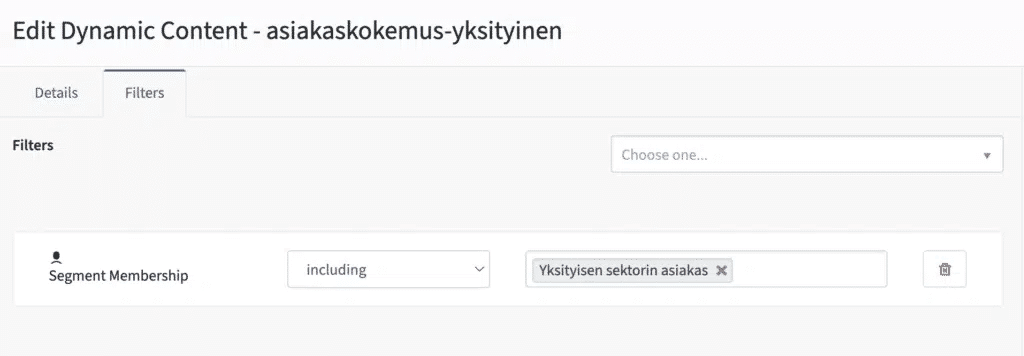
This content section will be given the short name “customer-experience-private” (asiakaskokemus-yksityinen).

Next, we define the conditions under which the content will be displayed on the website. It’s sufficient for us that the user belongs to the customer segment “private sector customer” (Yksityisen sektorin asiakas).

After that, we move to the content management system to edit the previously created landing page. The dynamic content is embedded between the sections titled “Kohti parempaa asiakaskokemusta” and “Personoinnin rakentaminen”.

Dynamic content from Mautic can be easily embedded into any content management system using HTML code. The necessary line of code can be copied and modified to include the correct dynamic content shortcode.

<div data-slot=”dwc” data-param-slot-name=”asiakaskokemus-yksityinen”>
&nbsp;
</div>

If no dynamic content is available to display, the &nbsp; automatically added by the editor will appear as a blank space on the page. However, this can be replaced with default text instead.

Testing personalization

Testing personalization is straightforward. Start by visiting the site in incognito mode, which keeps the user anonymous. The finalized landing page will look like this when the user has not been identified as a private sector customer.

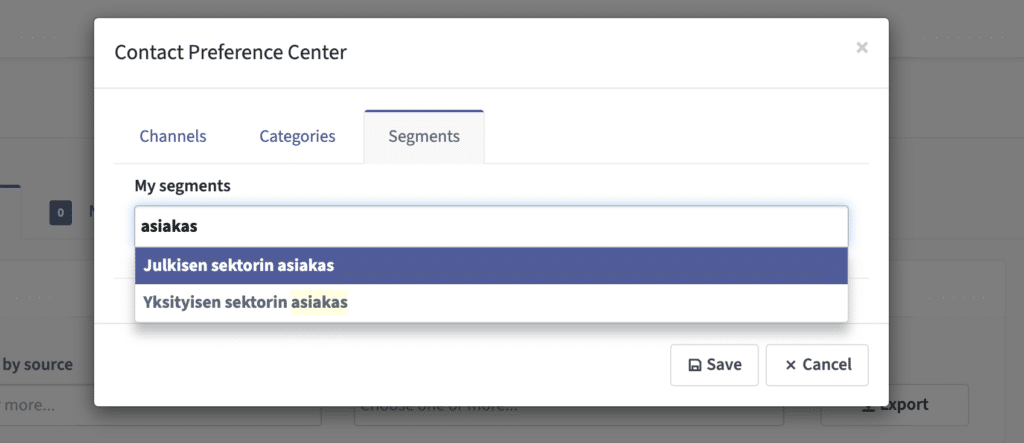
For testing purposes, find the anonymous user in Mautic and manually add him to the “Private Sector Customer” (Yksityisen sektorin asiakas) segment. Mautic can track both identified and unidentified users; the latter are users who do not yet have contact information or marketing consent. Personalization is one of the few ways to enhance the customer experience for these anonymous visitors.

Normally, segmentation would be automated by building a campaign within the marketing automation system. The customer segment could be determined based on the visitor’s browsing history, such as their interest in specific customer case studies or other pages.

However, for this test, we’ll manually add the user to the segment.

Select segment manually

The test user refreshes the landing page in his browser, and Mautic loads the personalized content onto the page. This means that the list of personalization features relevant to private sector customers—created with ChatGPT—appears in the desired location on the site.

Simple Yet Complex

This simple example demonstrates how website content can be tailored and targeted to a specific audience. The same outcome can be achieved in various ways, such as by creating separate landing pages for each segment and directing visitors to the appropriate pages via marketing campaigns. When personalization is integrated into marketing automation, it allows for better control over the customer experience for visitors arriving organically on the site.

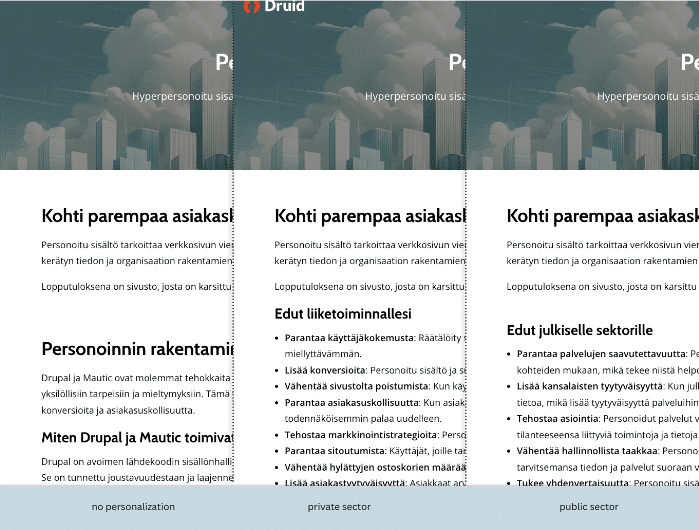
Segments and personalized content can be created freely, making it possible to implement more complex scenarios as needed. Below is a view of three different versions of the same landing page: one for non-segmented visitors and two for segmented user groups.

a view for no personalizationed page, personalization for private and public sector.

I implemented this example using the standard features of Drupal and Mautic in Druid’s demo environment. With a few small adjustments, the content editing experience can be further improved. For instance, dynamic content can be embedded by selecting the appropriate content block directly from the drop-down menu in Drupal’s editor.

If this topic piques your interest or resonates with your everyday needs, feel free to reach out. I’d be happy to give you a more detailed demonstration of Mautic’s functionalities.

Let’s talk

  • This field is for validation purposes and should be left unchanged.
  • Fill in the form and we’ll get back to you shortly.

Author

Mikko is the CEO of Druid with more than 20 years of experience in content management and customer experience development. He helps marketing and business teams harness the potential of technology, and his true passion lies in digital customer experience management systems

Nainen ja mies tutkivat yhdessä tietokoneen näyttöä.
20.08.2024
Mikko Hämäläinen

Streamline your digital marketing path: Tools, trends, and customer experience

In 2024, the life of a marketing professional is a tale of two extremes: on one side, there’s an abundance of data-driven marketing tools and information available, but on the other, the scales are weighed down by tightening legislation, increasingly complex technologies, and consumers’ (justified) concerns about privacy.

Let’s start with the customers. Today’s consumers are more independent, idealistic, and demanding than ever before. Companies must approach customers more personally and communicate on topics that matter to them, such as ethics, sustainability, and environmental responsibility. Moreover, focusing on the Zero Moment of Truth —the stage when consumers actively seek information —has become a marketing necessity.

Customer experience has become as important as the product itself and the price point. According to a Salesforce study, 80% of customers valued the customer experience as much as the products and services offered. Personalization plays a critical role in managing customer experience. Freshworks’ Deconstructing Delight study reveals that 63% of consumers expect brands to communicate with them in a personalized, value-based manner. During the pandemic, 53% of consumers switched brands due to poor communication.

If a consumer’s purchase journey spans three to seven channels, maintaining relevant communication becomes a daunting task—especially if those channels are disconnected and there isn’t a comprehensive view of the customer. The physical dimension, like in-store experiences and phone services, should also be considered when crafting an excellent customer experience. Information must be collected from all channels and disseminated across all touchpoints.

Hyper-Personalization: The AI-powered evolution of traditional personalization

While traditional personalization relies on historical data, hyper-personalization is reactive and real-time. It involves collecting information on customer actions across channels, analyzing it, and delivering content that meets their current needs.

Since customers are known to seamlessly switch between channels—browsing on their mobile in-store or starting a purchase on a computer and completing it on a bus ride—we need to be able to recognize our service users and link disparate sessions to the same customer profile. This information is used in both marketing and sales contexts. Twilio’s State of Personalization 2023 report highlights that 53% of consumers become repeat customers after a personalized experience.

Many consumers view persistent marketing communication as one of the great nuisances of the modern world, and AI as the final nail in the coffin of privacy. However, research repeatedly shows that well-executed data collection is often met with approval. Transparency, honesty, and responsible use of data soften consumer concerns. While only 51% of consumers (according to Twilio) trust brands to handle their data responsibly, 77% (according to Freshworks) are willing to share their data for a better customer experience.

Beyond consumer attitudes, legal frameworks and browser manufacturers have also thrown a wrench into the machinery of personalization. Who still remembers GDPR and its impact on marketing? Now, with Chrome phasing out support for third-party cookies and the waning influence of social media, it’s high time to focus on systematically gathering your own marketing data.

Here are my tips for tackling this challenge:

  1. Treat different channels as a unified whole. Consider how your customer’s journey crosses from the website to the mobile app and then to the physical store. What should ideally happen across these channels?
  2. Centralize data collection so it’s accessible across all channels and units within your organization. Customer Data Platforms (CDPs) are well-suited for this, and many come as user-friendly applications.
  3. Choose the right communication solutions, such as content management and marketing automation systems, and ensure their longevity, customization, and integration capabilities to avoid creating new silos.

A Unified customer experience across all channels

A system that delivers a coherent, multichannel customer experience is known as a Digital Experience Platform (DXP). Broadly speaking, this system integrates content management, marketing automation, CRM systems, and user data management under one umbrella. But it’s much more than that.

The goal of such a system is to create a seamless customer experience while providing the company with a holistic view of the customer through a single interface. It eliminates silos within the organization, allowing all units—from marketing to customer service—to better understand the customer’s needs and goals.

In terms of implementation, the system can be built modularly, leveraging components that the company already has in place—content management, marketing automation, analytics, and CRM. Customer data is brought together in a Customer Data Platform, where it can be further refined using AI.

A DXP can also be connected to other business systems as needed, such as e-commerce, product management, or ERP systems.

By tailoring the platform instead of opting for a ready-made (and often expensive) solution, you can build a DXP flexibly and expand it as your business evolves. This modular approach is cost-effective and allows for the replacement of individual components if they fall behind the curve.

Implementing such a system yourself enables vendor independence and ensures compliance with data protection laws. This is particularly beneficial in sensitive sectors (like healthcare, banking, and the public sector), where using traditional marketing stacks can be challenging due to privacy concerns.

I don’t believe every company should rush into building their own systems, but the facts are undeniable: in the future, competition for consumers will be tougher, the share of digital commerce will grow, and differentiation will become even more critical. Technology has advanced to meet these challenges, but it’s up to organizations to take the reins and start offering better customer experiences.

I discuss this topic in Finnish in the MarkkinointiRadio episode Customers Deserve Personalization. Listen to the podcast on Spotify or SoundCloud.

Want to learn more? Get in touch!

Author

Mikko is the CEO of Druid with more than 20 years of experience in content management and customer experience development. He helps marketing and business teams harness the potential of technology, and his true passion lies in digital customer experience management systems

Two women and one man working together in the meeting room.
31.07.2024

How to create an outstanding user experience on your website

Why does your company’s website exist? The question might sound trivial at first, as it’s clear in today’s world that if a business isn’t online, it might as well not exist. Consumers are online, and online interactions are only increasing. But is your web service truly customer-centric? Does it serve your customers more than it serves your business?

Most companies believe they offer a good customer experience, but rarely is the perspective genuinely customer-focused.

If you want your site to be more than just a mundane business card with basic info, promotional talk, and contact details, it must deliver value to your customers. And to provide value, you need to understand what your target audience values and needs.

From the company’s perspective, a good web service reaches the right people, and visitors find what they’re looking for and perform the desired actions.

From the visitor’s perspective, however, it’s more emotional: a good web service not only provides value but also feels pleasant and effortless to use. If it doesn’t, the customer is easily lost.

So how is a good user experience created online? These five steps will take you a long way.

1. Involve the users in the designing process

Too often, user needs are overlooked when building web services. It’s essential to utilize user testing and surveys during the design process. This ensures that the information is presented to users in the way they expect to receive it.

2. Ensure good usability

Users appreciate quick and effortless transactions. At its best, a web service is so easy to use that navigation is intuitive.

The service’s functionalities are clarified with visual elements, and users are gently but clearly guided along the path towards the desired action.

3. Provide truly useful content

It’s important to consider the entire customer journey rather than just a single purchase event. How can you help the visitor when they are just beginning to look for a solution to their problem? How can you serve the customer after the purchase? How can you encourage the customer to return?

Forget about your product and focus on solving the problems users face at different stages of their journey. Meaningful content that engages the customer is key here, whether it’s a thought-provoking blog post, guide, video, discussion forum, or even a recipe bank.

4. Make an impact with visuality

The appearance of the site should reflect your company’s message. A significant part of the first impression is formed based on the visual style of the site. The visual style is one of the most important tools a company has to convince the customer and build trust.

5. Invest in scalability

As your business grows, the user experience of the web service must scale smoothly with it. For the user, it’s important that the service operates consistently and that they don’t have to learn new things as the system expands.


A good user experience is a significant competitive advantage, and its importance for business success is constantly growing. It’s about serving customers and creating customer satisfaction.

Your website should be seen as a tool for building and maintaining customer relationships. At its best, your service not only supports your business but becomes a profitable business model in itself, delighting customers—so much so that they keep coming back and recommend it to others.

If you want to improve your website or have questions about its user experience, feel free to get in touch.

The blog post was originally published in 2017.

Author

Mies käyttää ruudunlukijaa
15.05.2024
Simo Hellsten

Fix accessibility problems at the (open) source

Accessibility is an important topic for people responsible for the profits and expenses of the web world – somewhat dependent on the nature of the actor. A lot of web commerce sites would do well welcoming the money from those clients who benefit from improved accessibility, while the public sector, that has no direct income, is bound by the law to provide accessible services. Faced with ever-tightening budget constraints, decision-makers may wonder about the most effective ways to improve accessibility. The easy answer is of course – have someone else do it, and for free.

The content of the internet today consists of a multitude of services, platforms and frameworks. While there are several strictly commercial companies with successful products, the majority of the internet we see today has its base on open source software. About two thirds of all the websites are built on open source software content management systems (CMS). The overwhelmingly biggest player in the field is WordPress, while Drupal is a strong second for large and complex sites.

Open source code is free to distribute and modify within the limits of it’s license. This has usually resulted in the software being developed and maintained by online communities. And the communities take the accessibility of their products seriously.

In the recent past I myself have spoken at both WordPress and Drupal developer community events and Drupal is a CMS where I contribute to accessibility and usability regularly. At Drupal’s chat forum the accessibility channel has 1560 participants ranging from developers interested in accessibility to hard-core accessibility professionals – some of whom are currently also working on the next generation of the international web content accessibility guidelines, WCAG 3. Drupal has also a monthly live online meeting on accessibility where one can present issues or ask questions. This is one of the ways to share accessibility knowledge in the community.

A typical website, depending on the complexity, has a development team of just a few people. While a lot of developers today have some level of accessibility skills, not all projects have an actual accessibility specialist in their team. This is where the community shows its power. Accessibility is always easier when done right from the beginning, instead of fixing afterwards based on testing the otherwise ready product. When the CMS of choice has gone through accessibility testing before being released as an installable distribution. A lot of the work has already been done by the community. And if (or more likely when) new issues arise during the individual site’s development, the community is available for advice on best practices and fixing newly found issues.

The community will help you to fix accessibility, but it is a two way road. When working on a project, every once in a while you come up with big or small accessibility issues that can be fixed at the source. These can be for example administration theme issues or maybe even some core JavaScript. When you or your team fix such an issue on your production site, make sure to give your code back to the CMS project core – or if the finding was about a contributed open source module to its source code. This way the effect of your finding will have a much bigger impact all over the Internet.

Just this spring my team, in which we develop and maintain a small number of university services, two of which use Drupal 10, identified three small accessibility issues that were part of the Drupal core. As we fixed the accessibility for our sites I made merge requests to Drupal core. This way we not only contributed to Drupal development but also got additional review for the code and even some advice on how to best implement the solutions proposed by our team’s web accessibility specialist in the Drupal core context. I even learned how to write my first Nightwatch.js test for the feature – something I probably wouldn’t have ended up doing if we had only fixed the issue on our own projects.

Now that our three small accessibility fixes have been merged to Drupal core, by the time sites have updated to the latest bug fix releases, we have contributed to one in eight enterprise web sites around the world. In small steps, we can make the world a better place. This is open source at its best.


Simo is member of Drupal UX team and following accessibility issues. He is also member of W3C Cognitive Accessibility Community Group, W3C Nordic Accessibility Group and IAAP.

Author

Simo Hellsten

Full Stack Developer